Development
What actually happens during a website build
Between signing off the design and launch day, a lot goes on that you never see. Here’s what a proper build involves, and why each part matters.

Ash Co-founder · Development & SEO · · 7 min read
Most people see two moments in a website project. There’s the design, which is exciting, and there’s the day it goes live. Everything in between can feel like a black box. You sign off some lovely designs, and then for a few weeks you get the occasional link to click and a lot of quiet.
That quiet is where I spend most of my time. I’m the developer half of Shock Creative, and I want to open the box a little. Partly because it helps to know what you’re paying for, and partly because the parts nobody sees are the parts that decide whether a site is still pleasant to use in three years’ time.
Turning a design into a plan
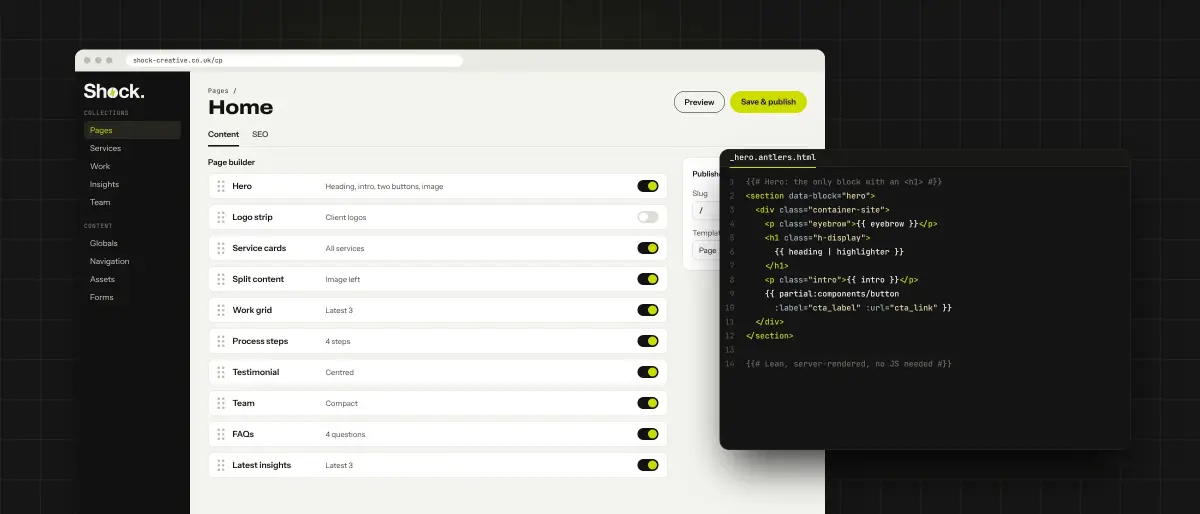
Before I write any code, I go through the designs page by page and break them into pieces. A row of service cards. A testimonial. A set of frequently asked questions. Most small business sites are made from fifteen or twenty of these pieces, arranged in different orders on different pages.
That matters to you more than it sounds. If each piece is built once and reused, you can put together a new page yourself in the control panel, and every testimonial on the site looks the same because it is the same. If every page is built as a one-off, every new page becomes a job for a developer, and small inconsistencies creep in over time.
This is also when I work out what you’ll want to change without me. Opening hours, team members, prices, the phone number in the footer. Anything likely to change becomes something you can edit, so you’re not emailing a developer to update your Christmas opening times.
And it’s when the platform gets chosen properly. We build on Statamic, WordPress and Laravel, and the right one depends on what the site needs to do and who’ll be looking after it day to day. There’s no single best answer, just the best fit for you.
Laying the foundations
The first real code is the dull, important stuff. The template every page sits inside, the header and footer, the fonts and colours, how headings and paragraphs look. I set up the content structure too: what a service page is made of, which fields a blog post has, how the menu is edited.
Then I build the pieces from the plan, one at a time, checking each on a phone as I go. A lot of your visitors will arrive on a phone, so I start with the small screen and let the layout open up as the screen gets bigger, rather than building for a desktop and squashing it down at the end.
Everything lives in version control from day one. Every change is recorded, so if something breaks I can see exactly what changed and when, and undo it in minutes. It sounds like housekeeping, and it is, but it’s also the difference between a calm fix and a frantic one.
The staging site
Fairly early on, you’ll get a link to a staging site. It’s a private copy of your new website on a real server, hidden from Google. You can click around it on your own phone, show it to colleagues and tell me what doesn’t feel right.
Please do use it. Feedback costs far less on a staging site than after launch, and you know your customers better than I do. If a page doesn’t answer the question people always ask you on the phone, I’d much rather hear that in week two than after the site is live.
Staging is also where your real content goes in. Placeholder text is kind to a design. Real text, with its long service names and the paragraph that runs a bit longer than planned, is where a layout gets tested properly. I’d always rather find out now that a heading wraps awkwardly on a small phone.
Speed is built in, not bolted on
Page speed often gets talked about as if it’s a setting you switch on with a plugin. It isn’t, really. A fast site is mostly the result of lots of small decisions made during the build, such as these.
Images sized for the screen: served in modern formats at the right size for each device, with their dimensions set so the page doesn’t jump about as it loads.
Fonts hosted on the site: rather than fetched from somewhere else on every visit, and only the weights the design actually uses.
Content in the HTML: sent ready to read from the server, so it appears straight away and search engines can read it without waiting for code to run.
As little JavaScript as possible: animation and small touches are nice, but the page shouldn’t depend on them to work.
None of these is exciting on its own. Together, they’re why one site feels instant on a train with one bar of signal and another sits on a white screen. Google measures this as well, so it feeds into how you rank. That’s why I think of speed as a development job first and an SEO job second. It’s much easier to build a site fast than to make a slow one fast later.
Testing before your customers do
Before launch, I go through the site the way a fussy visitor would. Every form gets filled in and sent, and I check the email actually arrives. Every link gets clicked. Pages get checked in different browsers, on a real phone, using only the keyboard, and with a screen reader for the basics.
I run speed and accessibility checks on every type of page, not just the homepage, and fix what they flag. Where a site has more moving parts, like bookings or a quote calculator, I write automated tests. They’re small pieces of code that check the important things still work every time anything changes, and they catch the bug that would otherwise have been found by a customer.
The search side gets checked properly too. Page titles and descriptions, the sitemap, structured data, and redirects from every old address that’s changing, so the rankings your current site has earned come with you to the new one.
Launch day
Launch is less dramatic than people expect, and that’s the point. The server is set up and tested in advance, so going live is mostly a matter of pointing your domain at it. Deploys are automated, so the site doesn’t go down while it switches over, and backups and SSL are in place before the first visitor arrives.
Afterwards, I keep a close eye on things for a while. I check Google Search Console for errors, make sure enquiries are coming through, and fix the odd thing that only shows up once real people start using the site.
What good development looks like a year later
You can’t really judge development on launch day. A new site built carelessly and a new site built well can look identical. The difference shows up later.
It shows up when you want to add a page and can do it yourself over a cup of tea. When the site gets an update and nothing breaks. When you ask for a new feature and get a sensible quote, rather than being told the whole thing needs rebuilding. When someone else needs to work on it and can make sense of what they find.
That’s what I’m aiming for on every build. Something fast, secure and tidy enough that the next person to open the code, whether that’s me or someone else, has an easy time of it. The code is yours once the project is paid for, so it should be something you’d be happy to hand over.
If you’re planning a new site and want to know how we’d approach it, our web development page covers the tools we use and how we work. Or just get in touch and ask. I’m always happy to talk through a build, even if it’s only to help you make sense of a quote from someone else.
Written by Ash
Ash is a senior full-stack developer based in West Yorkshire, working mainly in Laravel and Vue. He leads development and SEO at Shock Creative, and likes nothing more than a fast, properly built website that turns up in search and wins enquiries. More about us